
Content Protection
Hint: After participants complete a certain activity on the flipchart, you may need to protect further changes of the content totally or partially. Colltrain offers some flexible ways to achieve this!
Prerequisites
Section titled “Prerequisites”A flipchart-based activity started
How to protect the activity’s content
Section titled “How to protect the activity’s content”To enable this option, click on „Facilitate“ in the top menu and then on „Content protection“ in the drop-down list.
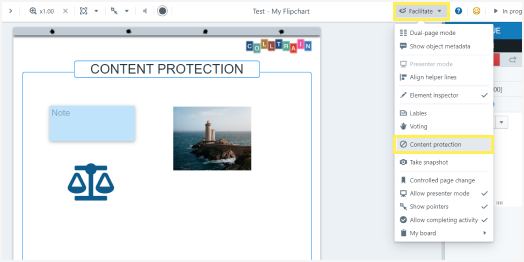
Facilitate Menu – Content protection
The window that pops up in the centre of the screen presents you with two options: to protect the content of the entire activity (no matter the number of pages or objects on pages) or the current page’s content only.
In both cases, you can restrict all actions performed to the objects posted on the page(s) by switching to the right button next to the “Select all” option or ticking the boxes below next to the actions you wish to restrict.
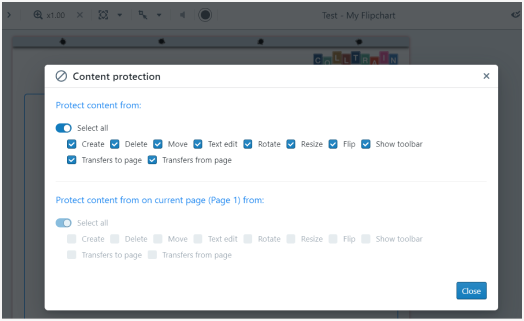
Content protection options
The actions that can be restricted to protect the content of the activity while running it are listed below.
- Create new content by adding new objects on the page from the toolbar or by duplicating the existing ones
- Deleting objects
- Moving the objects
- Text editing
- Rotating, resizing or flipping any object
- Displaying the object’s toolbar
- Transferring objects from the page or to the page
They apply to all existing and newly created objects on the page. If you want to restrict specific actions to a specific object(s), access the “Element behaviours” option (see more on this topic on the “Object Behaviours” page)
Any combination of those above is possible, depending on your need.
Below you can see total content protection in the before and after screenshots.
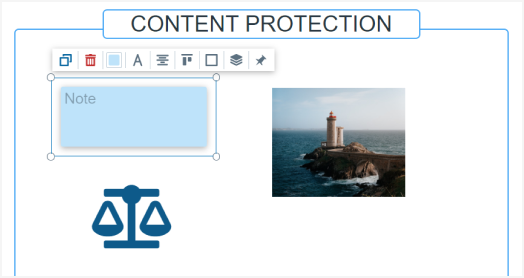
Object behaviour BEFORE content protection was enabled.
Please take a close look at the frame around the sticky note. You may notice that the toolbar is not visible anymore.
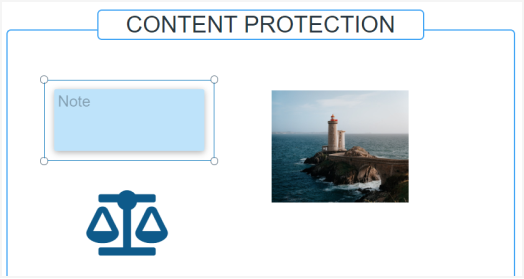
Object behaviour AFTER content protection was enabled
Task for you
Section titled “Task for you”Decide upon the level of content protection you need in one of the activities you’ll use in your next training session and set it by following the steps above.
Experiment with both roles: Facilitator and participant, to understand this feature completely.